

Microsoft Integrates AI into Windows 11 with Experimental Agentic Features
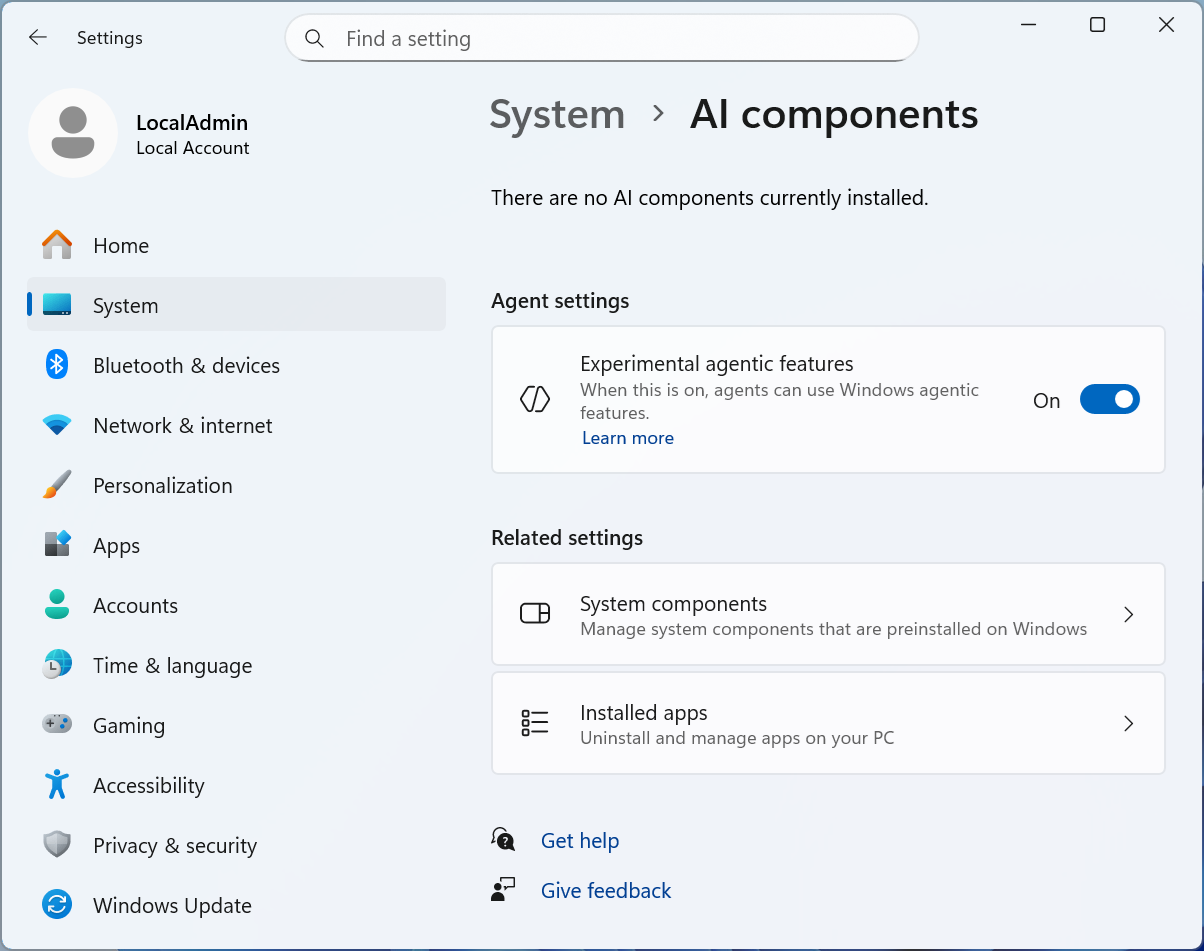
Microsoft has been adding AI features to Windows 11 for years, but things have recently entered a new phase, with both generative and so-called “agentic” AI features working their way deeper into the bedrock of the operating system. A new build of Windows 11 released to Windows Insider Program testers includes a new “experimental agentic features” toggle in the Settings to support a feature called Copilot Actions, and Microsoft has published a detailed support article detailing more about just how those “experimental agentic features” will work.
What are Agentic Features?
If you’re not familiar, “agentic” is a buzzword that Microsoft has used repeatedly to describe its future ambitions for Windows 11—in plainer language, these agents are meant to accomplish assigned tasks in the background, allowing the user’s attention to be turned elsewhere. Microsoft says it wants agents to be capable of “everyday tasks like organizing files, scheduling meetings, or sending emails,” and that Copilot Actions should give you “an active digital collaborator that can carry out complex tasks for you to enhance efficiency and productivity.”
Possible Risks and Attempted Fixes
But like other kinds of AI, these agents can be prone to error and confabulations and will often proceed as if they know what they’re doing even when they don’t. They also present, in Microsoft’s own words, “novel security risks,” mostly related to what can happen if an attacker is able to give instructions to one of these agents. As a result, Microsoft’s implementation walks a tightrope between giving these agents access to your files and cordoning them off from the rest of the system.
For now, these “experimental agentic features” are optional, only available in early test builds of Windows 11, and off by default.
Credit: Microsoft
Safety Measures
For example, AI agents running on a PC will be given their own user accounts separate from your personal account, ensuring that they don’t have permission to change everything on the system and giving them their own “desktop” to work with that won’t interfere with what you’re working with on your screen. Users need to approve requests for their data, and “all actions of an agent are observable and distinguishable from those taken by a user.” Microsoft also says agents need to be able to produce logs of their activities and “should provide a means to supervise their activities,” including showing users a list of actions they’ll take to accomplish a multi-step task.
Conclusion
Microsoft’s integration of AI into Windows 11 is a significant step forward, but it also presents new challenges and risks. As the technology continues to evolve, it’s essential to balance the benefits of AI with the need for safety and security. With the right precautions in place, agentic features have the potential to revolutionize the way we interact with our computers and make our lives more efficient.
Frequently Asked Questions
Q: What are agentic features in Windows 11?
Agentic features refer to AI-powered agents that can perform tasks in the background, allowing users to focus on other things.
Q: Are agentic features available to all Windows 11 users?
No, agentic features are currently only available in early test builds of Windows 11 and are off by default.
Q: How do I enable agentic features in Windows 11?
To enable agentic features, you need to be part of the Windows Insider Program and have the latest test build of Windows 11 installed. You can then toggle the “experimental agentic features” switch in the Settings.
Q: Are agentic features secure?
Microsoft has implemented various safety measures to minimize the risks associated with agentic features, including giving AI agents their own user accounts and requiring user approval for data requests. However, as with any new technology, there are potential risks and challenges that need to be addressed.